Aller au contenu
View in the app

A better way to browse. Learn more.

CIVILMANIA

A full-screen app on your home screen with push notifications, badges and more.

To install this app on iOS and iPadOS
  1. Tap the Share icon in Safari
  2. Scroll the menu and tap Add to Home Screen.
  3. Tap Add in the top-right corner.
To install this app on Android
  1. Tap the 3-dot menu (⋮) in the top-right corner of the browser.
  2. Tap Add to Home screen or Install app.
  3. Confirm by tapping Install.
Exprimer un besoin

MIDOUNE Narimene

Membres
  • Inscription

  • Dernière visite

Fichiers posté(e)s par MIDOUNE Narimene

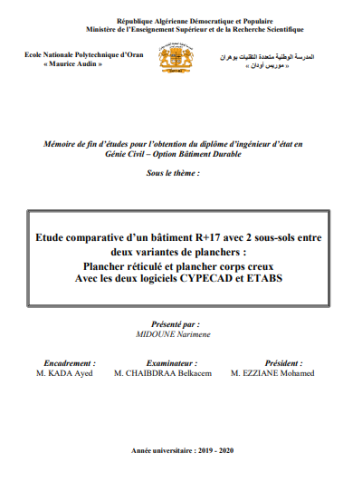
  1. Je mets à votre disposition mon mémoire de fin d'études, j'espère qu'il vous sera utile, j'attendrai vos retours ! 
    Ce rapport est une étude  d’un bâtiment R+17 avec 2 sous-sols entre deux variantes de planchers: Plancher réticulé et plancher corps creux, avec les deux logiciels CYPECAD et ETABS
          Son but est de faire une comparaison entre les deux variantes de planchers du coté technique et économique d’une part, et de voir la différence entre les deux logiciels CYPECAD et ETABS d’une autre part.
    Mots clés :
    Bâtiment, durabilité, béton, réticulé, corps creux, comparaison, CYPECAD, ETABS, SAFE, RPA 99/2003, BAEL91, DTR 3.2,
    • Gratuit
    • 416 Téléchargements
    • 10 Commentaire s
    Mis à jour

Configure browser push notifications

Chrome (Android)
  1. Tap the lock icon next to the address bar.
  2. Tap Permissions → Notifications.
  3. Adjust your preference.
Chrome (Desktop)
  1. Click the padlock icon in the address bar.
  2. Select Site settings.
  3. Find Notifications and adjust your preference.