Aller au contenu
View in the app

A better way to browse. Learn more.

CIVILMANIA

A full-screen app on your home screen with push notifications, badges and more.

To install this app on iOS and iPadOS
  1. Tap the Share icon in Safari
  2. Scroll the menu and tap Add to Home Screen.
  3. Tap Add in the top-right corner.
To install this app on Android
  1. Tap the 3-dot menu (⋮) in the top-right corner of the browser.
  2. Tap Add to Home screen or Install app.
  3. Confirm by tapping Install.
  • Réponses 5
  • Vues 6.1k
  • Créé
  • Dernière réponse

Meilleurs contributeurs dans ce sujet

Messages populaires

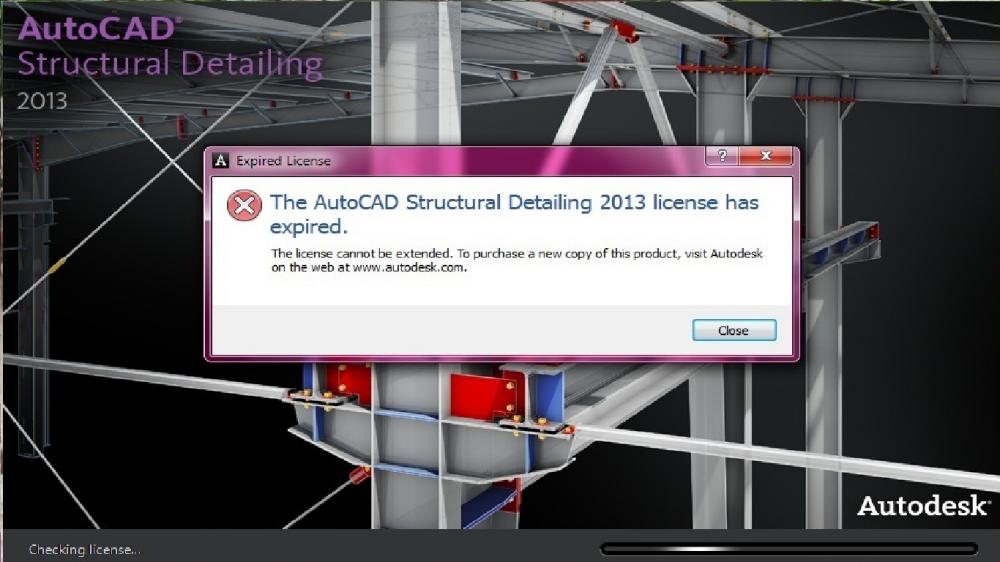
  • Salam, voila la solution de votre problème : To install ASD 2013_Trial expiration date issue_HF Hotfix You must have administrative privileges on your Microsoft® Windows® operating system to complete
Images postées

recommended_posts

  • 2 semaines après...
comment_99663

Salam,

voila la solution de votre problème :

To install ASD 2013_Trial expiration date issue_HF Hotfix

You must have administrative privileges on your Microsoft® Windows® operating system to complete the installation process.

This installation requires you to replace the following file:

    • acadbtn.xmx

To replace these files

  1. Restart system.
  2. Navigate to ASD installation folder; for example C:\Program Files\Autodesk\AutoCAD 2013\ASD
  3. Rename the affected original file:
    • In the product installation folder, right-click the acadbtn.xmx file and rename it to acadbtn.bak
  4. Double click the file:
    • ASD 2013_Trial expiration date issue_HF.zip
  5. Extract acadbtn.xmx to ASD installation folder; for example C:\Program Files\Autodesk\AutoCAD 2013\ASD

lien pour télécharger ASD 2013_Trial expiration date issue_HF.zip: http://www.generalfil.es/download/gs61f863ebh32i0/ASD_2013_Trial_expiration_date_issue_HF.zip.html


  • 3 semaines après...
  • Auteur
comment_99998

Salam,

voila la solution de votre problème :

To install ASD 2013_Trial expiration date issue_HF Hotfix

You must have administrative privileges on your Microsoft® Windows® operating system to complete the installation process.

This installation requires you to replace the following file:

    • acadbtn.xmx

To replace these files

  1. Restart system.
  2. Navigate to ASD installation folder; for example C:\Program Files\Autodesk\AutoCAD 2013\ASD
  3. Rename the affected original file:
    • In the product installation folder, right-click the acadbtn.xmx file and rename it to acadbtn.bak
  4. Double click the file:
    • ASD 2013_Trial expiration date issue_HF.zip
  5. Extract acadbtn.xmx to ASD installation folder; for example C:\Program Files\Autodesk\AutoCAD 2013\ASD

lien pour télécharger ASD 2013_Trial expiration date issue_HF.zip: http://www.generalfil.es/download/gs61f863ebh32i0/ASD_2013_Trial_expiration_date_issue_HF.zip.html


cette méthode ne marche pas avec moi parce que le fichier en question n'est pas téléchargeable. la solution c'est de changer la date sur l’ordinateur. merci pour ton aide Aimen21 ;)

  • 5 ans après...
  • 1 an après...

Rejoindre la conversation

Vous pouvez publier maintenant et vous inscrire plus tard. Si vous avez un compte, connectez-vous maintenant pour publier avec votre compte.
Remarque: votre message nécessitera l’approbation d’un modérateur avant de pouvoir être visible.

Invités
Répondre à ce sujet…

Configure browser push notifications

Chrome (Android)
  1. Tap the lock icon next to the address bar.
  2. Tap Permissions → Notifications.
  3. Adjust your preference.
Chrome (Desktop)
  1. Click the padlock icon in the address bar.
  2. Select Site settings.
  3. Find Notifications and adjust your preference.