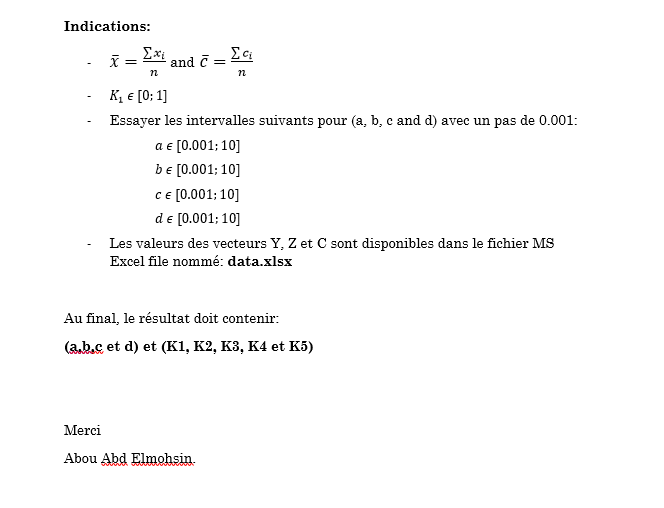
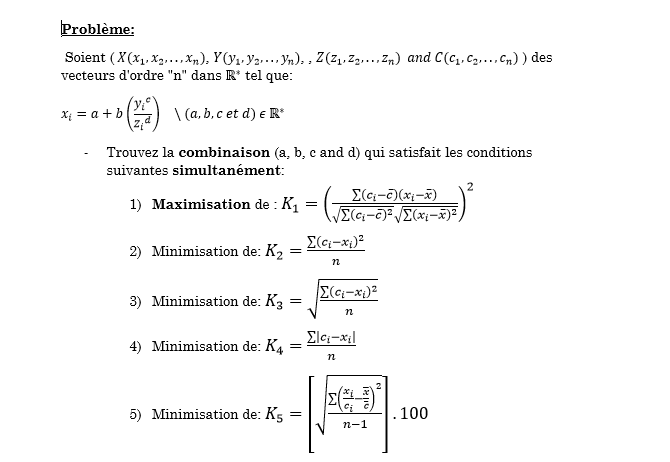
J'ai un petit problème nécessite la programmation sous Matlab, puisqu'il n'est pas vraiment faisable sur MS Excel.
Est qu'il y a quelqu'un parmi vous qui maîtrise un peut Matlab qui peut nous offrir la solution, puisque je suis pratiquement nul en Matlab et j'ai vraiment besoin de la réponse le plus tôt possible.
Les fichiers de ce problème sont ci-dessous.
(probleme.docx ou 1.PNG et 2.PNG pour l'énoncé du problème et data.xlsx pour les données liées à ce dernier)
Vous pouvez publier maintenant et vous inscrire plus tard.
Si vous avez un compte, connectez-vous maintenant pour publier avec votre compte.
Remarque: votre message nécessitera l’approbation d’un modérateur avant de pouvoir être visible.





comment_124770bonjour Alikom,
J'espère que vous êtes en bonne santé.
J'ai un petit problème nécessite la programmation sous Matlab, puisqu'il n'est pas vraiment faisable sur MS Excel.
Est qu'il y a quelqu'un parmi vous qui maîtrise un peut Matlab qui peut nous offrir la solution, puisque je suis pratiquement nul en Matlab et j'ai vraiment besoin de la réponse le plus tôt possible.
Les fichiers de ce problème sont ci-dessous.
(probleme.docx ou 1.PNG et 2.PNG pour l'énoncé du problème et data.xlsx pour les données liées à ce dernier)
Merci.
Cordialement.
Abou Abd Elmohsin.
data.xlsx
probleme.docx