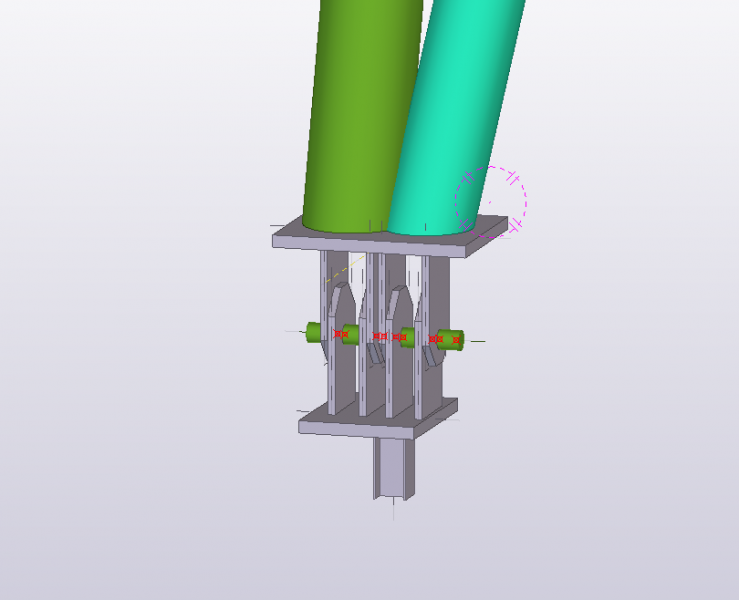
J'AI UNE SALLE POLYVALENTE AVEC UNE APPUIS ARTICULEE .ET SELON LES VERIFICATIONS DES CONDITIONS DE L'ARTICULATION . NE DAPASSE PAS AVEC UNE ARTICULATION ORDINAIRE( PLATINE +TIGES) . IL FAUT SOUTER AU ROTULE COMME INDIQUER SUR LA PHOTO JOINTE .
LE PROBLEMME EST COMME CALCULER CE TYPE DES APPUIS C' EST TRES URGANT?
Vous pouvez publier maintenant et vous inscrire plus tard.
Si vous avez un compte, connectez-vous maintenant pour publier avec votre compte.
Remarque: votre message nécessitera l’approbation d’un modérateur avant de pouvoir être visible.





comment_128775BONJOUR J
J'AI UNE SALLE POLYVALENTE AVEC UNE APPUIS ARTICULEE .ET SELON LES VERIFICATIONS DES CONDITIONS DE L'ARTICULATION . NE DAPASSE PAS AVEC UNE ARTICULATION ORDINAIRE( PLATINE +TIGES) . IL FAUT SOUTER AU ROTULE COMME INDIQUER SUR LA PHOTO JOINTE .
LE PROBLEMME EST COMME CALCULER CE TYPE DES APPUIS C' EST TRES URGANT?