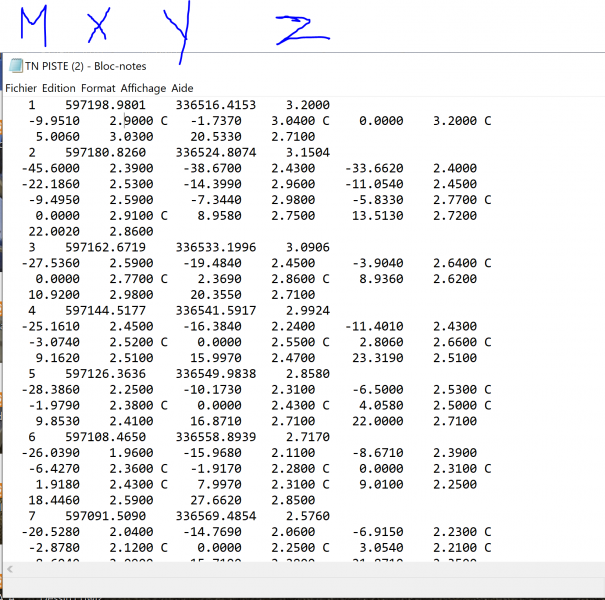
Posté(e) Avril 3, 20215 a comment_148589 Bonjour la famille j'espère que vous allez bien, J'ai un petit soucis au niveau d'introduction des points dans Covadis j'aimerais savoir comment je peut introduire un fichier des points (Levé par profil) et j'insiste par profil non chargement des points semis sous la forme suivante : ( M X Y Z : et les points droite et gauche avec leur altitudes Z ) comme illustré dans la photo suivante :





comment_148589Bonjour la famille
j'espère que vous allez bien, J'ai un petit soucis au niveau d'introduction des points dans Covadis
j'aimerais savoir comment je peut introduire un fichier des points (Levé par profil) et j'insiste par profil non chargement des points semis
sous la forme suivante : ( M X Y Z : et les points droite et gauche avec leur altitudes Z ) comme illustré dans la photo suivante :