ALSALAM 3ALYKOM
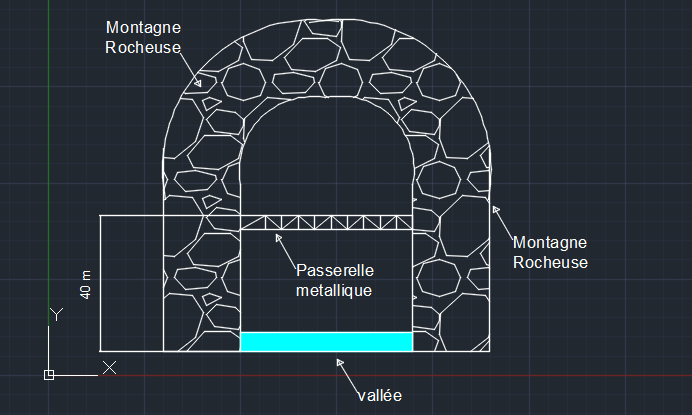
Mes Frères, s'il vous plaît, j'ai une étude d'une
Passerelle metallique situé entre deux montagnes rocheuses
 fermées par le haut. La seule façon d'entrer  le vent
 est l'ouverture entre elles.
 Ma question est de savoir s'il existe un moyen pour calculer
 le coefficient de topographie merci d'avance
Vous pouvez publier maintenant et vous inscrire plus tard.
Si vous avez un compte, connectez-vous maintenant pour publier avec votre compte.
Remarque: votre message nécessitera l’approbation d’un modérateur avant de pouvoir être visible.





comment_155758ALSALAM 3ALYKOM Mes Frères, s'il vous plaît, j'ai une étude d'une Passerelle metallique situé entre deux montagnes rocheuses fermées par le haut. La seule façon d'entrer le vent est l'ouverture entre elles. Ma question est de savoir s'il existe un moyen pour calculer le coefficient de topographie merci d'avance