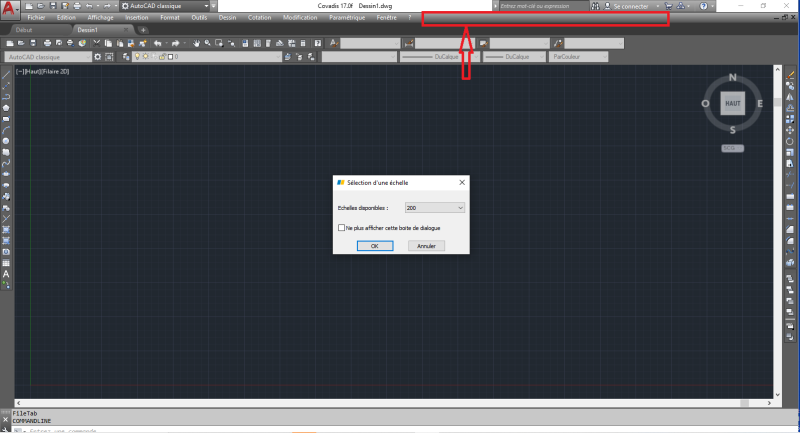
Je viens solliciter votre aide pour la résolution d'un problème rencontrer sur le logiciel COVADIS. Le Menu Covadis ne s'affiche plus. Voir image.
J'ai d'abord fait un migration d'AutoCAD classique à AutoCAD dessin d'Annotation pour un travail nécessitant uniquement le logiciel AutoCAD puis une deuxième migration d'AutoCAD dessin d'Annotation vers AutoCAD classique. Et à la deuxième migration, j'ai constaté que la barre de menu Covadis ne s'affichait plus.
Bien vouloir m'aider pour que je puisse poursuivre mon travail sur Covadis.
Vous pouvez publier maintenant et vous inscrire plus tard.
Si vous avez un compte, connectez-vous maintenant pour publier avec votre compte.
Remarque: votre message nécessitera l’approbation d’un modérateur avant de pouvoir être visible.





comment_193150Bonjour chers amis,
Comment allez-vous ?
Je viens solliciter votre aide pour la résolution d'un problème rencontrer sur le logiciel COVADIS. Le Menu Covadis ne s'affiche plus. Voir image.
J'ai d'abord fait un migration d'AutoCAD classique à AutoCAD dessin d'Annotation pour un travail nécessitant uniquement le logiciel AutoCAD puis une deuxième migration d'AutoCAD dessin d'Annotation vers AutoCAD classique. Et à la deuxième migration, j'ai constaté que la barre de menu Covadis ne s'affichait plus.
Bien vouloir m'aider pour que je puisse poursuivre mon travail sur Covadis.
Merci d'avance.